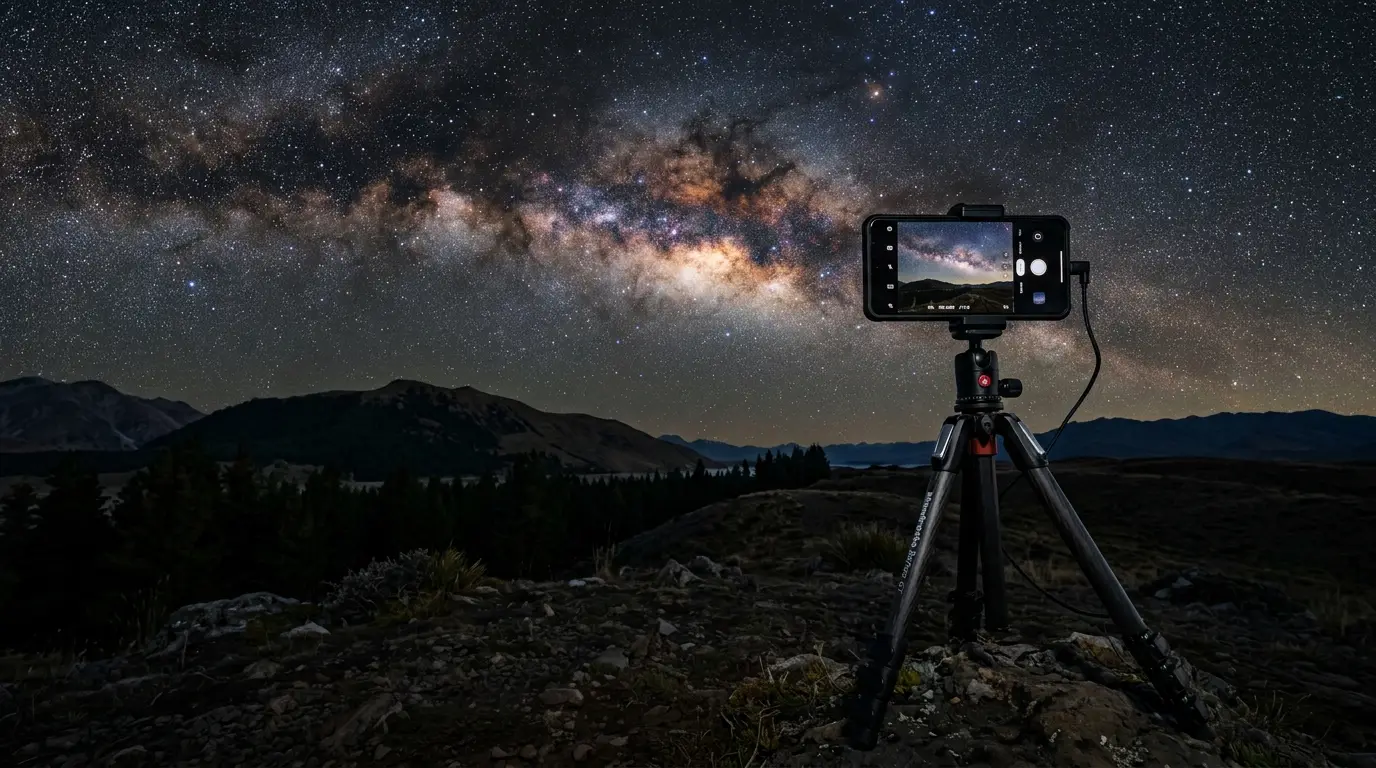
Smartphone mounted on a tripod photographing the Milky Way, the core setup for smartphone astrophotography

Smartphone Astrophotography Kit: What You Really Need

A phone captures the Milky Way and aurora color surprisingly well, but not stars. Here's the smartphone astrophotography kit that's actually worth carrying.

Our top pick

JOBY GripTight PRO 3 Mount

Best phone clamp

No single item in this kit is the "best buy" the way a camera body would be. The purchase that matters most is whatever stops the phone from moving during a multi-second exposure: a rigid clamp and a stable tripod, in that order. Everything else on this list solves a smaller, specific problem once the phone is already steady.

A handheld phone shooting a 3-second night exposure records visible motion blur from nothing more than your own pulse and breathing. Mount it on a tripod and that blur disappears entirely, no software fix required.

Runner-up: The Xenvo Shutterbug Bluetooth remote — the $20-to-25 item most beginners skip on their first trip and regret by the second.

A modern flagship phone can genuinely capture the night sky, but only within limits worth naming upfront. On a tripod, in a dark enough location, an iPhone or Galaxy phone can render the Milky Way as a real, structured band of light rather than a vague smudge, and can pull genuine color out of an aurora display that might look pale green or grey to the naked eye. What it cannot do is resolve individual faint stars, star clusters, or nebula detail the way even an inexpensive tracked mirrorless camera can. The sensor is too small, and multi-frame computational stacking cannot manufacture resolution the optics never captured.

Getting a phone to do what it can do reliably comes down to accessories that eliminate two specific failure modes: a wobbling phone, and shake at the moment of exposure. A blurry, noisy phone photo of the night sky is almost always one of those two problems, not a phone limitation. A rigid clamp and a stable tripod remove the wobble; a Bluetooth remote or the phone's own timer removes the shake that comes from tapping the screen.

Cold is the other quiet failure mode nobody plans for. A phone battery that reads 90 percent at the hotel can die in twenty minutes at a windy, freezing overlook, and a bargain power bank riding in the same jacket pocket usually can't save it either. This kit sorts the accessories that solve real problems from the one item most beginners can skip because their phone already does the job: a clip-on wide-angle lens, mostly redundant on any phone with a built-in ultra-wide camera.

Ranked list

How we chose

The places on this list were selected against the following editorial criteria.

  • Stability decides everything: a screen tap or an unsteady tripod introduces more blur in a multi-second exposure than any lens or sensor upgrade can fix.
  • Cold drains phones fast: standard lithium-ion cells lose roughly half their rated capacity around -18°C, exactly the conditions of an aurora chase or a winter Milky Way trip.
  • Native software beats most add-ons: iPhone's Night Mode Max and Samsung's Expert RAW Astrophoto mode already do more than most bought accessories can add.
  • A wide-angle lens attachment is the one item worth skipping if the phone already has a built-in ultra-wide camera.
  • Red light preserves dark adaptation: a single white flash costs 20 to 30 minutes of night vision that a red headlamp never touches.

All picks at a glance

  • JOBY GripTight PRO 3 Mount

    Best phone clamp
    Price
    Commonly around $40–50 street
    Why it makes the list
    Spring-loaded clamp, 2 cold shoes, 360° rotation, standard 1/4"-20 tripod thread
  • Manfrotto PIXI EVO 2-Section Mini Tripod

    Best travel tripod
    Price
    Typically $85–90 street
    Why it makes the list
    Aluminum 2-section legs, built-in ball head, holds up to 2.5kg, splays nearly flat for low angles
  • Xenvo Shutterbug Bluetooth Remote

    Best shake-free shutter
    Price
    Usually $19–26
    Why it makes the list
    Bluetooth clicker, no app needed on most phones, keychain-sized
  • Celestron Night Vision Red Headlamp

    Best red headlamp
    Price
    $20.95, confirmed directly from Celestron
    Why it makes the list
    Red-only LED, up to 100 hours on low beam, 2x AAA batteries
  • Nitecore Summit 10000 Power Bank

    Best cold-weather power bank
    Price
    Typically $110–120 street
    Why it makes the list
    10,000mAh, USB-C PD fast charging, heating function rated to -40°C
  • Moment Wide 18mm Lens

    Best premium wide-angle lens (often skippable)
    Price
    Typically $125–150 for the lens, plus Moment's case system
    Why it makes the list
    18mm-equivalent glass optics, requires Moment's case/mount system
  • Generic 3-in-1 Clip-On Lens Kit

    Best cheap alternative (with caveats)
    Price
    Commonly $15–20 for generic kits
    Why it makes the list
    Universal clip-on 3-in-1 kit; soft corners and distortion at night, per reviewers

Reporter notebook

Insider tips

Money tip

Skip the clip-on lens if your phone already has an ultra-wide

Every current iPhone Pro and Galaxy Ultra ships with a built-in ultra-wide camera that covers most Milky Way framing on its own. Save the $125-plus a Moment lens costs, plus its case system, unless you own an older or base-model phone without one, or you genuinely want a wider field than the native lens gives you.

What to bring

Keep the power bank against your body, not in your bag

A cold-rated power bank still loses some charge efficiency in freezing temperatures. An inner jacket pocket, close to body heat, keeps it recovering a drained phone faster than the same bank left in an outer pocket or a backpack's top pouch.

In this guide

7 places
  1. JOBY GripTight PRO 3 Mount

    Best phone clamp

    Commonly around $40–50 street

    The JOBY GripTight PRO 3 Mount is the missing link between a phone and any tripod already on the market: a spring-loaded clamp with two cold shoes for adding a light or mic later, and a standard 1/4"-20 thread that fits practically every tripod sold, from an inexpensive travel tripod to a full camera tripod already gathering dust in a closet. The clamp tightens mechanically rather than snapping onto a magnetic MagSafe ring, and that distinction matters more at night than it sounds: a magnetic mount can shift slightly if the wind gusts or a hiking boot catches a tripod leg, and a shifted phone mid-exposure ruins the shot outright. A screw clamp doesn't move unless you loosen it. It rotates a full 360 degrees for portrait shots of a vertical Milky Way arch, and it works over most phone cases, so there's no need to shoot bare-back in the cold. The one thing it doesn't do is include the tripod itself; treat it as the clamp half of a two-part purchase, paired with a tripod like the one below.

    Pros

    • Fits any 1/4"-20 tripod, not locked to one brand
    • Two cold shoes for adding a light or mic later
    • Mechanical clamp, no magnetic slip risk

    Cons

    • Doesn't include a tripod, needs pairing with one
  2. Manfrotto PIXI EVO 2-Section Mini Tripod

    Best travel tripod

    Typically $85–90 street

    The Manfrotto PIXI EVO 2-Section Mini Tripod solves the problem that actually ruins most phone night shots: not the lens, the wobble. Its aluminum legs and built-in ball head absorb the small vibrations that plastic tripods transmit straight into a multi-second exposure, which is the exact spec that photography-gear roundups converge on for night work: rigidity over reach. The legs adjust through five angle steps and can splay almost flat to the ground, useful for low, foreground-heavy Milky Way compositions rather than shots pointed straight up from head height. Rated to hold 2.5kg, it comfortably supports a phone-and-clamp combo with room to spare. It ships without a phone mount, so it needs pairing with a clamp like the JOBY above; Manfrotto also sells bundles with a third-party adapter, if buying one item is the priority.

    Pros

    • Aluminum build resists vibration during long exposures
    • Legs splay flat for low-angle Milky Way shots
    • Well under a pound, easy to pack

    Cons

    • Needs a separate phone clamp, not phone-native out of the box
    • 2.5kg limit is fine for a phone, not a DSLR
  3. Xenvo Shutterbug Bluetooth Remote

    Best shake-free shutter

    Usually $19–26

    The Xenvo Shutterbug is a keychain-sized Bluetooth clicker that solves a problem most beginners don't see coming until their first blurry frame: tapping the screen to start a long exposure shakes the phone enough to visibly blur a 2 to 4 second shot, especially on a lightweight travel tripod. Pairing takes seconds on most modern phones, no app required, and the button fires the native camera shutter directly. It's not the only option in this price band; CamKix and zttopo make near-identical clickers, but Xenvo shows up most consistently across gear roundups. The honest alternative, if you'd rather not buy anything: every phone's built-in 2 to 3 second timer does the same job for free. The remote just means one less menu to dig through with cold fingers in the dark.

    Pros

    • Removes screen-tap shake entirely
    • Cheap and pocket-sized
    • No app pairing needed on most phones

    Cons

    • A phone's built-in timer does the same job for free
  4. Celestron Night Vision Red Headlamp

    Best red headlamp

    $20.95, confirmed directly from Celestron

    A Celestron Night Vision Red Headlamp earns a place in a phone kit for a reason that has nothing to do with the camera itself: setting up a clamp, leveling a tripod, and fumbling with a Bluetooth pairing screen all happen in near-total darkness, and a white flashlight or a bright phone screen undoes 20 to 30 minutes of dark adaptation in under a second. This headlamp is genuinely red-only, confirmed directly on Celestron's own site, with no white-light mode to trigger by mistake mid-setup. Low beam runs about 100 hours on two AAA batteries, more than enough for a full night of gear-wrangling. At under $25, it's the cheapest item in this whole kit, and arguably the one most beginners skip until their eyes have already paid the price.

    Pros

    • Genuinely red-only, no white-mode fumble risk
    • Up to 100 hours of runtime on low beam
    • Cheap enough to buy without a second thought

    Cons

    • Uses disposable AAA batteries, not rechargeable
  5. Nitecore Summit 10000 Power Bank

    Best cold-weather power bank

    Typically $110–120 street

    Cold is the accessory failure nobody plans for. A standard lithium-ion power bank loses roughly half its rated capacity around -18°C compared to room temperature, exactly the conditions of a winter Milky Way trip or an aurora chase at a northern latitude, which means a phone that read 100 percent at the hotel can die well before sunrise, and a bargain power bank in the same jacket pocket often can't recover it either. The Nitecore Summit 10000 is built specifically for that scenario: a heating function activates automatically below freezing to keep the cell inside its working range, and Nitecore rates it to function down to -40°C. USB-C PD fast charging tops a drained phone back up quickly between shots, and 10,000mAh covers a full night of screen-heavy long-exposure shooting. It costs more than a generic bank of the same capacity; that premium is the entire point of buying this one instead. One habit matters regardless of brand: keep the power bank in an inner jacket pocket against body heat, not an outer pocket or a backpack's top pouch.

    Pros

    • Purpose-built heating function rated to -40°C
    • Fast USB-C PD charging recovers a drained phone quickly
    • 10,000mAh covers a full night of shooting

    Cons

    • Costs more than a generic bank of the same capacity
  6. Moment Wide 18mm Lens

    Best premium wide-angle lens (often skippable)

    Typically $125–150 for the lens, plus Moment's case system

    The Moment Wide 18mm Lens is the one item in this kit where the honest answer is: most beginners can skip it. Any phone with a built-in ultra-wide camera, now standard on iPhone Pro models and Galaxy Ultra phones, already covers most Milky Way framing without buying anything. Where the Moment lens earns its keep is on an older or base-model phone with no built-in ultra-wide, or for a photographer who wants a wider field than even a native ultra-wide provides. It uses real glass optics, noticeably sharper corner-to-corner at night than the plastic elements in bargain clip-on kits, but it doesn't attach with a simple universal clip: it requires buying into Moment's own case or lens-mount system, an added cost on top of the lens itself. Budget for the full ecosystem, not just the glass, before deciding this one is worth it.

    Pros

    • Real glass optics, sharper than bargain clip-on kits
    • Widens the field of view beyond a native ultra-wide

    Cons

    • Requires buying into Moment's case/mount ecosystem
    • Skippable if your phone already has a built-in ultra-wide
  7. Generic 3-in-1 Clip-On Lens Kit

    Best cheap alternative (with caveats)

    Commonly $15–20 for generic kits

    Generic 3-in-1 clip-on lens kits, wide, macro, and fisheye elements on a spring clip, sell for around $15 to $20 from true no-name brands (named options like Xenvo's Pro Lens Kit or SHUTTERMOON typically run a bit higher, closer to $25 to $35), and they're the tempting cheap alternative to spending $125-plus on the Moment lens above. The catch: reviewers consistently note soft corners and visible distortion once these are pointed at a night sky, exactly the conditions where a lens's weaknesses show up most. They're a reasonable way to try wide-angle phone photography cheaply, or fine for daytime landscape shots, but for a dedicated night kit they're the accessory most likely to disappoint. If your phone already has a built-in ultra-wide, skip this tier entirely rather than buying down.

    Pros

    • Far cheaper than a premium lens system
    • Fine for daytime or casual use

    Cons

    • Soft corners and distortion at night, per reviewers
    • No single confirmed product recommendation; quality varies by brand

Every price above is a snapshot, not a quote. Amazon's own product pages blocked a direct fetch-and-confirm check on five of these six items during research (the Celestron headlamp was the exception, verified directly against Celestron's own site), so treat every dollar figure here as a typical street price rather than a number to screenshot and hold a seller to. Check the current listing before buying anything.

The kit itself sorts into three tiers. Non-negotiable: a clamp and a stable tripod, because nothing else on this list matters if the phone can move during a multi-second exposure. Cheap and easy to regret skipping: the Bluetooth remote and the red headlamp, both under $50 combined, both solving a problem beginners don't notice until they've already ruined a frame or blown their night vision. Situational: the cold-weather power bank, essential for a winter or aurora trip and unnecessary for a warm-season Milky Way shoot closer to home, and the wide-angle lens, which most phones with a built-in ultra-wide camera don't actually need.

None of this replaces learning the phone's own software. iPhone's Night Mode engages automatically once the phone detects it's steady, and iOS 26 reportedly extended its maximum single exposure from around 10 seconds up to about 30 seconds under "Night Mode Max," though only when the phone is completely still on a mount. Samsung's free Expert RAW app adds a dedicated Astrophoto mode that reportedly runs several minutes of multi-frame stacking with celestial tracking built in, a genuinely different capability from the stock camera's standard Night mode, and it's a separate download from the Galaxy Store rather than something built into every Galaxy phone's default camera app. Learn which mode a specific phone uses before the trip, not during it.

A phone kit like this gets a beginner a real, shareable shot of the Milky Way or an aurora display. It does not replace a dedicated astro camera setup, and it was never going to: the sensor is too small, and no amount of computational stacking manufactures resolution the optics never captured. If the destination is genuinely dark, pair this kit with a look at the best aurora forecast apps so the timing is right before the gear even comes out of the bag.

Frequently asked questions

Can you photograph the Milky Way with a smartphone?

Yes, within real limits. A modern flagship phone on a stable tripod, in a dark enough sky (Bortle 4 or darker), can capture the Milky Way as a genuine bright band with visible structure and some color, not just a vague smudge. What it can't do is resolve individual faint stars or deep-sky detail the way even an entry-level tracked camera can, because the sensor is physically tiny by comparison and no amount of software stacking can invent resolution the optics never captured.

What phone settings should I use for aurora (northern lights) photos?

Mount the phone on a tripod first, since a handheld shot at the shutter speeds aurora photography needs will blur regardless of settings. From there, let the phone's own night-photography mode do the heavy lifting: iPhones trigger Night Mode automatically once they detect the phone is steady, and Samsung's free Expert RAW app has a dedicated Astrophoto mode built for exactly this. Both can reveal aurora color and movement more vividly than the naked eye perceives it.

Do I need a tripod for night sky photos with a phone?

Yes, effectively always. Any exposure long enough to gather useful light from stars or an aurora display, several seconds at minimum, will blur if the phone moves even slightly, and a handheld shot moves. A compact travel tripod paired with a phone clamp solves this for around $125 to $140 combined and matters more than any other single purchase in this kit.

What's the best iPhone or Android night mode setting for stargazing?

On iPhone, Night Mode is automatic once the phone senses it's still, and iOS 26 reportedly extended its maximum single exposure from around 10 seconds up to about 30 seconds under a mode Apple calls "Night Mode Max," though only with the phone completely stationary. On Samsung Galaxy phones, the stock camera's Night mode tops out much shorter; the free Expert RAW app's separate Astrophoto mode is built specifically for the sky and reportedly supports several minutes of multi-frame stacking with built-in celestial tracking.

How long should a phone's exposure be for star photos?

Longer than a phone's standard photo mode ever uses on its own: several seconds at minimum, and up to several minutes with a dedicated astrophotography mode using multi-frame stacking. Standard Night modes on most current phones run somewhere in the 5 to 10-second range, while dedicated modes like Samsung's Expert RAW Astrophoto or Apple's newer Night Mode Max are built to go much longer, and only work reliably with the phone completely motionless.

Why does my phone photo of the night sky look blurry or noisy?

Almost always one of two problems, not the phone's fault: motion (a handheld shot, a wobbly tripod, or the shake from tapping the screen to start the exposure) or too little light reaching the sensor in too short an exposure, which shows up as noise once the phone's software brightens the image afterward. A stable tripod and a Bluetooth remote or timer solve the first problem; shooting from a genuinely dark location, away from light pollution, solves the second.

Does cold weather affect phone battery life for night photography?

Significantly. Standard lithium-ion batteries lose roughly half their rated capacity around -18°C compared to room temperature, and a phone that reads fully charged at the hotel can die well before sunrise at a cold, windy overlook. A cold-rated power bank with a built-in heating function recovers a drained phone faster than a generic bank at the same capacity, and keeping any power bank in an inner jacket pocket against body heat helps regardless of brand.

Further reading

Sources